
How To Connect Your Etsy Shop To Instagram Shopping Step By Step

Want to tag your Etsy products directly in posts, Reels, and Stories so shoppers can tap and buy? Connecting your Etsy shop to Instagram Shopping is one of the fastest ways to drive qualified traffic and increase conversions. In this guide, you’ll learn the exact steps—plus the easiest way to keep your Instagram and Facebook shops in perfect sync with your Etsy listings using the Catalog Generator for Etsy.
Quick links:
- Start your free trial of Catalog Generator for Etsy (7 days, $5/month after): https://catalog-generator.webyze.com/
- Video tutorial: https://www.youtube.com/watch?v=2ChLE92Cu4s
What you’ll achieve by the end of this guide
- A verified domain connected to your Etsy shop
- A live product catalog that auto-syncs from Etsy to Instagram and Facebook
- Product tagging enabled across posts, Reels, and Stories
Before you start: requirements checklist
- Instagram Business account (switch from Personal in Settings > Account > Account type)
- Facebook Page connected to your Instagram account
- Meta Business account: https://business.facebook.com/
- An active Etsy shop with at least a few listings
Step-by-step: connect Etsy to Instagram Shopping
- Create or access your Meta Business account
- Go to https://business.facebook.com/ and create an account if you don’t have one.
- Link your Facebook Page and Instagram account inside Business Settings (Accounts > Pages and Accounts > Instagram accounts).
- Verify your Etsy domain in Meta Business Manager
This proves you’re allowed to link products back to your shop.
- In Business Settings, go to Brand Safety & Suitability > Domains > Add.
- Add your Etsy shop domain. Use the format yourshopname.etsy.com (confirm by visiting it—you should be redirected to your Etsy shop page).
- Meta will provide a meta tag to verify ownership.
- In Etsy, go to Shop Manager > Settings > Facebook Shops, paste the meta tag into the field, and click Connect.
- Return to Business Settings and click Verify. When verified, your domain shows as active.
- Generate a live product feed from Etsy (the easy way)
Manual spreadsheets are tedious and quickly go out of date. Instead, use an automated data feed that always mirrors your Etsy listings.
- Visit Catalog Generator for Etsy: https://catalog-generator.webyze.com/
- Start the 7-day free trial (only $5/month afterward, cancel anytime).
- Connect your Etsy shop—this grants read access to your listings so the app can build your catalog.
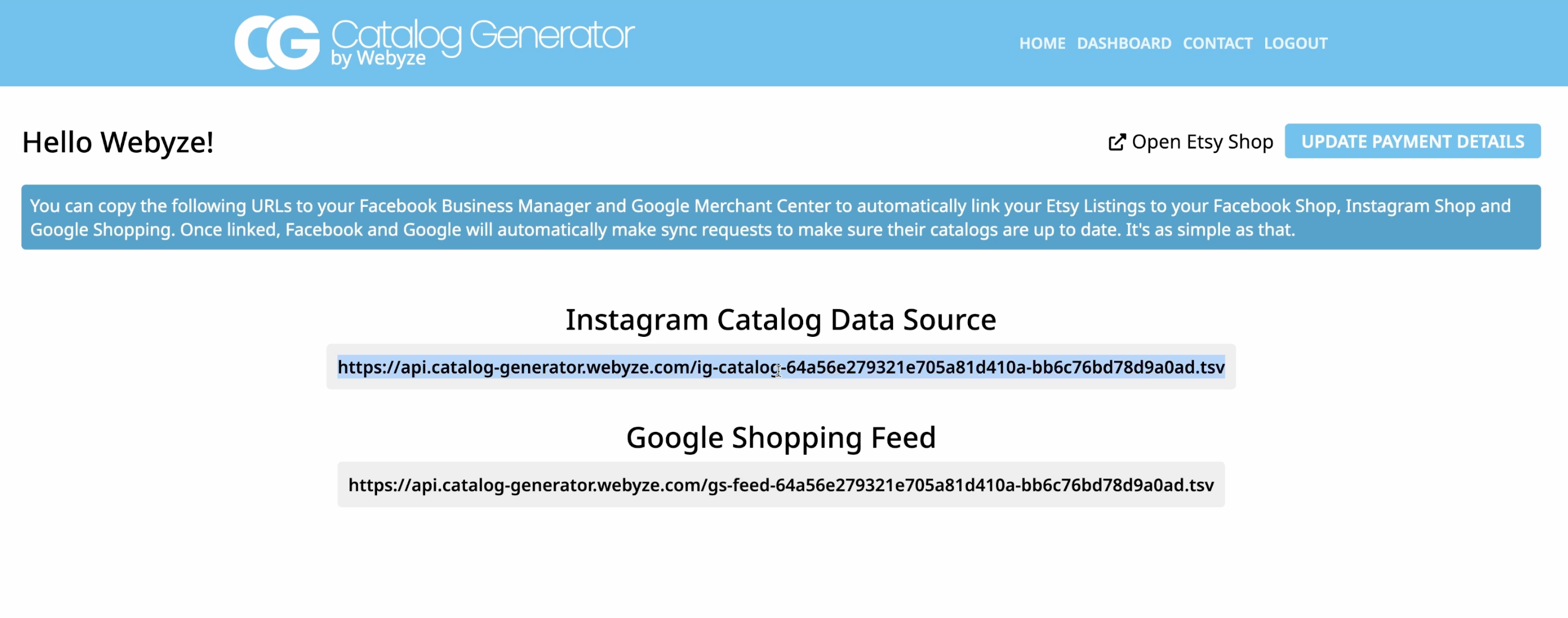
- Copy the unique feed URL the app generates for you.
Why this tool? It eliminates manual uploads and keeps your catalog synced automatically whenever you add, edit, or hide a listing in Etsy—so your Instagram Shop and Facebook Shop stay current.
- Create a catalog in Commerce Manager and connect your feed
- In Meta Business Suite, open Commerce Manager (from the main menu).
- Create or select your Commerce account > Catalogs > Add Items.
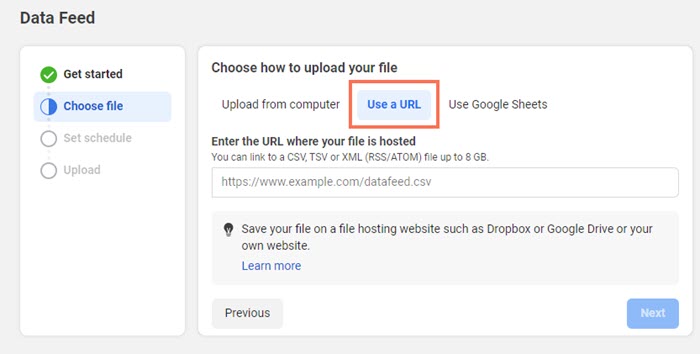
- Choose Data feed (we’re importing all items at once via URL).
- When prompted to upload, pick the option to use a URL rather than a file.
- Paste the feed URL from Catalog Generator.
- Schedule automatic syncs
- Set a daily (or more frequent) schedule so your catalog re-fetches the latest Etsy changes.
- Click Save feed and upload. Depending on how many listings you have, the first import may take several minutes.
- After upload, browse Items to confirm your products appear correctly.
- Submit your domain for approval and enable product tagging
- In Commerce Manager > Settings > Domains, submit your verified domain for approval (if requested under “Not submitted”).
- Once approved and your catalog is connected to your Instagram account, go to Instagram app > Settings > Business > Shopping and select your catalog.
- You can now tag products in posts, Reels, and Stories, and shoppers can tap through to your Etsy listings.
Watch the full video tutorial
For a visual walkthrough of the exact clicks and screens, watch: https://www.youtube.com/watch?v=2ChLE92Cu4s
For a visual walkthrough of the exact clicks and screens, watch: https://www.youtube.com/watch?v=2ChLE92Cu4s
Optimization tips to increase Etsy sales from Instagram
- Use strong product titles and descriptions in Etsy—these flow into your feed and help discovery.
- Upload high-resolution, well-lit images with clean backgrounds.
- Tag multiple relevant products per post where appropriate.
- Publish Reels and Stories with product stickers for higher reach.
- Feature seasonal collections and bestsellers in Highlights.
- Keep inventory accurate in Etsy—Catalog Generator will sync availability to your shop catalog.
Troubleshooting common issues
- Catalog empty or missing items: Ensure your data feed URL from Catalog Generator is correct and that the scheduled fetch has completed. Re-run a manual fetch if needed.
- Domain not verifying: Double-check you pasted the exact meta tag into Etsy (Shop Manager > Settings > Facebook Shops), then click Verify again in Business Settings.
- Items pending review or rejected: Review Commerce Manager diagnostics for policy or data issues (e.g., missing images, prohibited items). Fix in Etsy; the next sync updates your catalog.
- Product images not showing: Confirm your primary listing photos meet size/ratio guidelines and are publicly accessible via Etsy.
- Can’t enable Instagram Shopping: Make sure your Instagram account is Business, linked to your Facebook Page, and that your domain is verified and approved.
Why sellers love Catalog Generator for Etsy
- Always in sync: Avoid manual CSV uploads and errors.
- Fast setup: Paste one URL in Commerce Manager.
- Affordable: Just $5/month. 7-day free trial—test risk-free.
- Helpful support: Setup instructions included, and the team is here to help if you get stuck.
Start now
- Generate your Etsy-to-Instagram catalog in minutes: https://catalog-generator.webyze.com/
- Try it free for 7 days, cancel anytime. After that, it’s just $5/month for a fully automated pipeline that saves hours and prevents listing mistakes.
Step-by-step recap
- Create a Meta Business account and link your Facebook Page + Instagram account.
- Verify your Etsy domain in Business Settings using the meta tag via Etsy’s Facebook Shops setting.
- Install Catalog Generator for Etsy and copy your unique data feed URL: https://catalog-generator.webyze.com/
- In Commerce Manager, create a catalog, add items via Data feed (URL), and schedule daily syncs.
- Submit your domain for approval in Commerce Manager.
- Enable Instagram Shopping and start tagging products in posts, Reels, and Stories.
Pro note: After the initial setup, the Catalog Generator app keeps everything in sync behind the scenes—no more manual catalog management. Focus on your content and customers while your listings auto-update across Facebook and Instagram Shops.