
How To Connect Etsy To Instagram Shopping And Tag Products
If you sell on Etsy, turning your Instagram audience into buyers is one of the fastest ways to grow. The key is enabling Instagram Shopping so you can tag products directly in posts, Reels, and Stories—sending people straight to your Etsy listings with a tap.
In this guide, you’ll learn exactly how to connect your Etsy shop to Instagram Shopping using a simple, automated feed. We’ll cover setup, approval, and best practices—and show you how to keep your product catalog in sync with zero manual work.

What you’ll need
- An Etsy shop with active listings
- A Facebook Business account (to access Commerce Manager)
- A linked Facebook Page and Instagram Business/Creator account
- A product catalog data source (automated is best)
- The Catalog Generator for Etsy to auto-sync your listings for Instagram and Facebook Shops
Catalog Generator is a lightweight Etsy app that creates a live data feed of your listings you can plug into Commerce Manager. It keeps your products automatically updated—no spreadsheets or manual uploads. Try it here: Catalog Generator — Start Free Trial. It’s just $5/month after a 7‑day free trial, cancel anytime.
Why connect Etsy to Instagram Shopping?
- Tag products in feed posts, Reels, and Stories for frictionless shopping
- Auto-redirect shoppers from Instagram to the exact Etsy listing
- Keep your catalog synced as you add, edit, or remove products
- Increase traffic and conversion from social to your Etsy store
Step-by-step: Connect Etsy to Instagram Shopping and tag products
1) Create/confirm your Business account and link assets
- Go to business.facebook.com and create or log in to your Business account.
- In Business Settings, link your Facebook Page and Instagram account to the Business account.
- Ensure your Instagram is set to Business or Creator (free and required for product tagging).
2) Verify your Etsy shop’s domain
Commerce Manager requires verifying the domain you’ll direct shoppers to.
- In Business Settings, open Brand Safety > Domains.
- Click Add and enter your Etsy shop domain in this format: yourshopname.etsy.com
- Choose the Meta-tag verification method and copy the meta tag provided.
- In Etsy Shop Manager, go to Settings > Facebook Shops and paste the meta tag.
- Return to Business Settings and click Verify. Once verified, you’re set.
3) Create your product catalog in Commerce Manager
- Open Commerce Manager from the menu and create or choose a catalog.
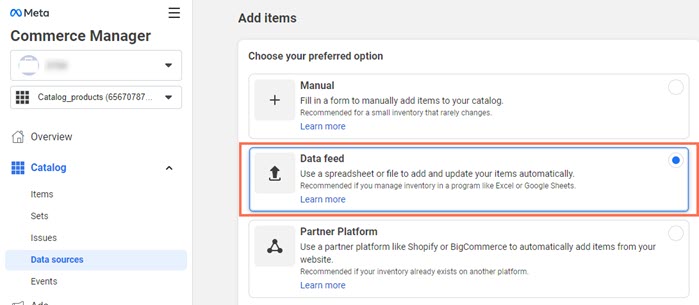
- Go to Add Items > Data feed (we’ll import everything at once via URL).
4) Generate your Etsy data feed URL (automated)
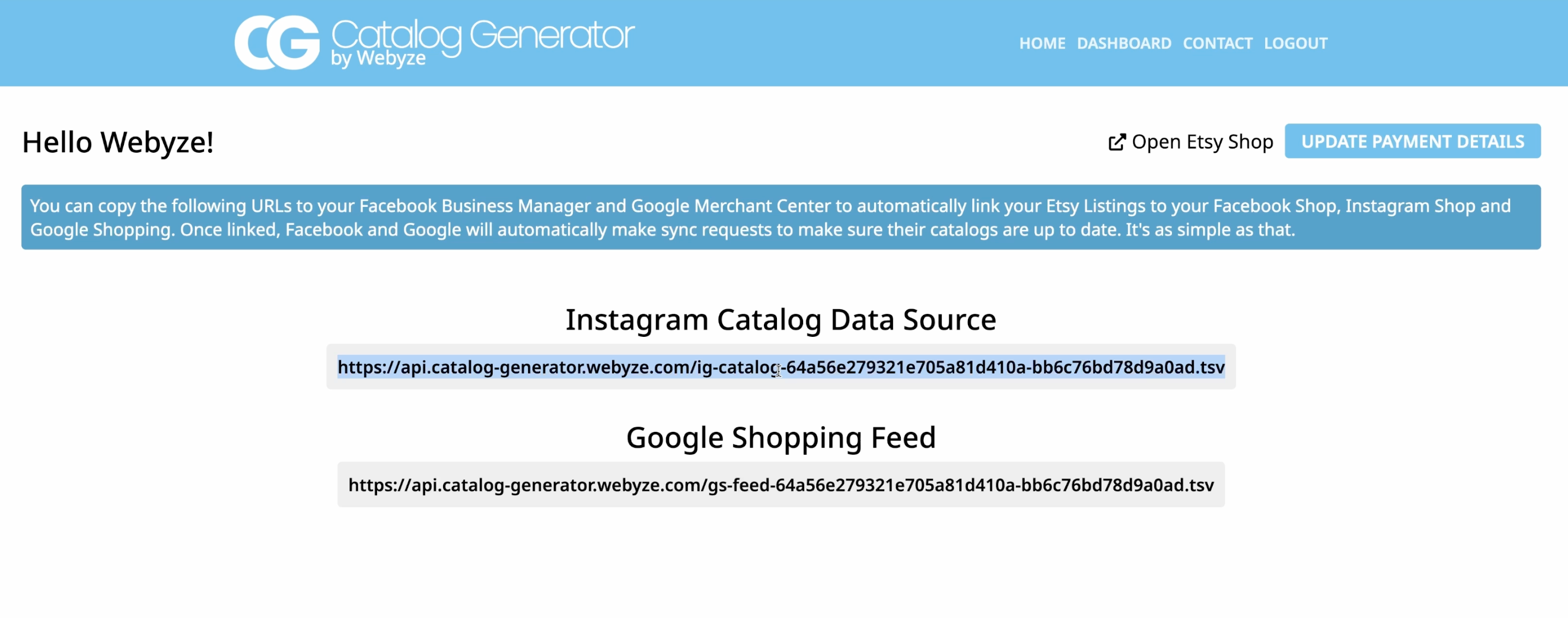
- Open Catalog Generator for Etsy and sign up or log in.
- Connect your Etsy shop to allow access to your listings.
- Copy the feed URL provided by the app.
5) Add your feed URL to Commerce Manager and schedule syncs
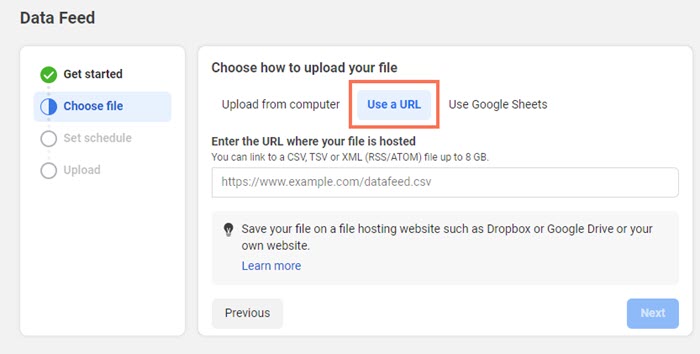
- In Commerce Manager, choose "Use a URL" for your data feed.
- Paste the Catalog Generator feed URL.
- Set your update schedule (daily is ideal to keep products fresh).
- Save and upload. Your listings will start importing—this may take a few minutes depending on catalog size.
Once imported, you’ll see your items under Catalog > Items. From now on, changes you make on Etsy will auto-sync via the Catalog Generator feed.
6) Submit your domain for review and enable Shopping on Instagram
- In your catalog Settings, locate the Website or Domain section and submit your verified domain for approval.
- After approval, open the Instagram app > Settings and privacy > Business > Shopping.
- Choose your connected catalog and complete the prompts.
- Start tagging products in posts, Reels, and Stories. On the tagging screen, search and select the exact product.
That’s it—you’ve linked Etsy to Instagram Shopping and can tag products that deep-link shoppers to your Etsy listings.
Pro tips to boost reach and conversion
- Optimize product titles and descriptions on Etsy with clear keywords (material, size, style, occasion).
- Use bright, high-resolution photos (square and 4:5 vertical perform well on feed and Reels).
- Tag multiple products per post when relevant and pin the primary item in Reels.
- Add product stickers in Stories and save evergreen Stories to Highlights (e.g., "New Arrivals").
- Create themed collections (e.g., "Gifts under $40") and feature them in Reels and carousels.
- Encourage UGC: invite customers to tag your shop; reshare with product tags to build trust.
- Analyze insights in Instagram and Commerce Manager to double down on top performers.
Troubleshooting and quick fixes
- Shopping access pending or rejected: ensure you’ve verified your domain, linked IG to the Business account, and meet commerce policies.
- No products showing in IG: wait for the first feed sync to finish, then check Catalog > Items.
- Wrong prices or out-of-stock items: confirm the daily schedule is on; you can trigger a manual fetch in Commerce Manager.
- Domain verification fails: confirm you used yourshopname.etsy.com, pasted the meta tag in Etsy (Settings > Facebook Shops), then clicked Verify.
- Image or data quality issues: use clear, well-lit photos; include price, availability, condition, and accurate titles.
Watch the full setup in action
- Video walkthrough: Link your Etsy listings with your Instagram Account and Facebook Page — Catalog Generator for Etsy
https://www.youtube.com/watch?v=2ChLE92Cu4s
Keep it automated (and affordable)
With Catalog Generator for Etsy, your product feed stays in sync automatically with Commerce Manager, powering your Instagram and Facebook Shops without spreadsheets or uploads. It’s just $5/month after a 7‑day free trial, cancel anytime.
Ready to tag products and drive more sales from social?
- Start here: Catalog Generator — Free 7‑Day Trial
- Set your feed to daily and let it run in the background
- Focus on creating thumb-stopping content while your catalog updates itself
Your audience is already browsing—make every post shoppable and send them straight to your Etsy listings.