
Download Your Squarespace Site to HTML and Self‑Host It Easily with ExFlow
If Squarespace hosting is starting to feel too expensive for your needs, or you simply want the freedom to self-host, you are not alone. Many creators, freelancers, and agencies are looking for a reliable Squarespace Exporter or Squarespace Downloader to download a Squarespace site to HTML and move to a cheaper, more flexible setup.
In this guide, you will learn how to:
- Download your Squarespace site as static HTML, CSS, JS, and images
- Remove platform badges, add custom scripts/styles, and export all pages
- Self-host the exported site on ExFlow, S3, Git/Pages, or any FTP server
The secret sauce is ExFlow, a simple tool that lets you export Webflow and Squarespace sites as static files and even host them directly. Start here: https://exflow.site

Why download your Squarespace site to HTML?
- Cost savings: If Squarespace is too expensive, self-hosting can dramatically reduce ongoing costs.
- Control and flexibility: Deploy anywhere, integrate with custom tooling, set your own caching, and control your domain setup completely.
- Portability and backups: Keep a portable static copy of your content that you can host on any server.
- Performance: Static sites are fast by default and easy to optimize.
Important note: Only export sites you own or have permission to export, and follow the platform terms. ExFlow can access password-protected Squarespace sites when the owner provides the password.
What you need
- Your site URL
- Access to the site (and password if protected)
- A hosting destination (ExFlow hosting, S3, Git-based static hosting, or an FTP server)
Step-by-step: Download your Squarespace site to HTML with ExFlow
- Open ExFlow
- Go to https://exflow.site
- This is your all-in-one Squarespace to HTML exporter and downloader.
- Enter your site URL
- Paste the full domain of your Squarespace site.
- If your site is protected, provide the password when prompted (owner-provided credentials only).
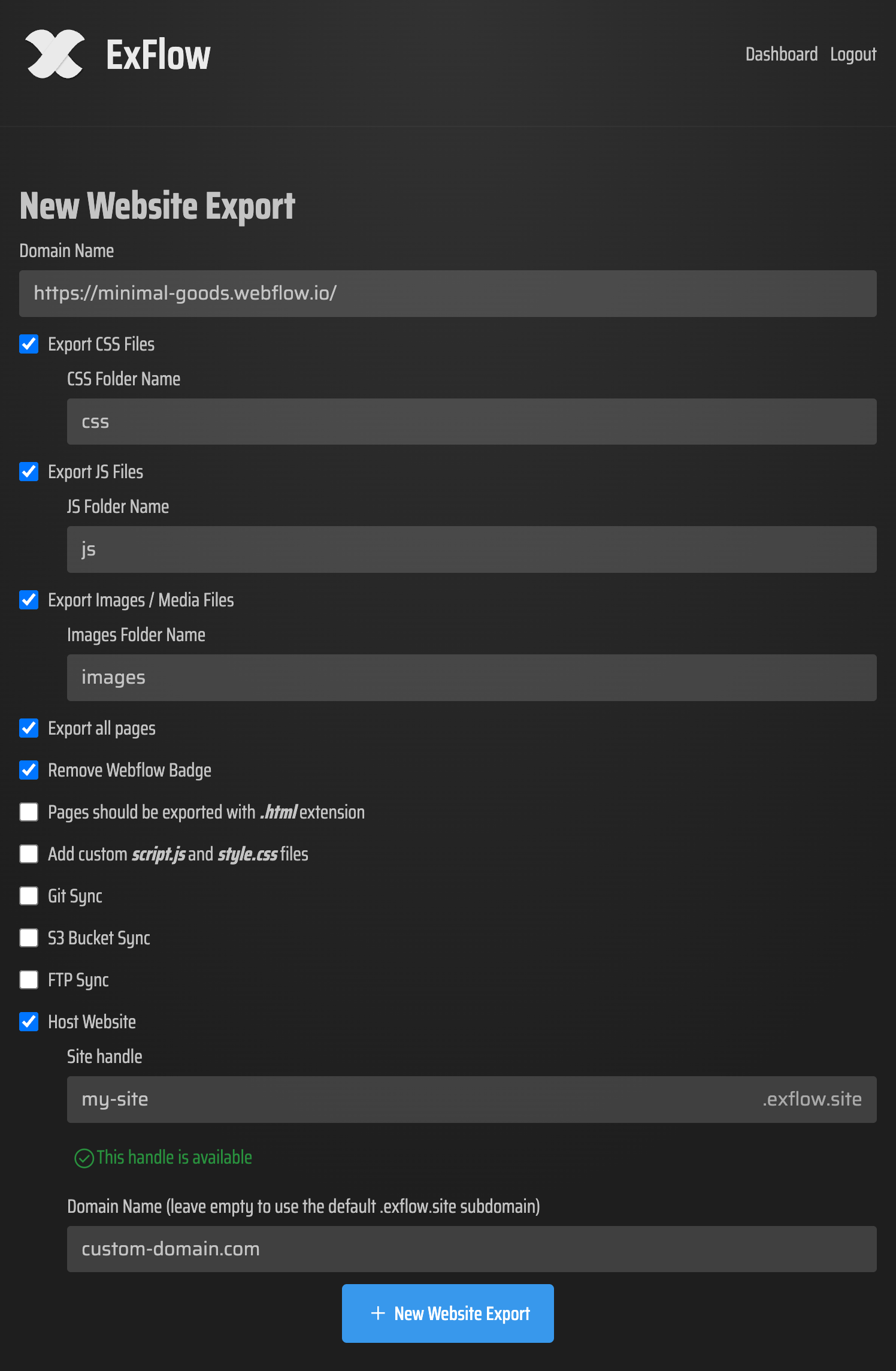
- Choose export settings
- Export CSS files
- Export JS files
- Export images and media
- Export all pages (great for full-site backups)
- Remove badge if present
- Pages exported with .html extension
- Add custom script.js and style.css
- Optional automatic sync: Git, S3, FTP
- Start the export
- ExFlow will bundle your pages, assets, and dependencies into a clean static package.
- You can download a ZIP or sync directly to a hosting target.
- Verify locally
- Unzip the download and open index.html in your browser, or run a tiny local server for accurate asset paths:
python3 -m http.server 8000
- Then visit http://localhost:8000 in your browser.
Self-hosting options (pick one)
- One-click hosting on ExFlow
- The simplest path: choose hosting during export and let ExFlow serve your static site with unlimited bandwidth.
- Map a custom domain from your dashboard.
- Great for teams that want a Squarespace alternative without managing infrastructure.
- Amazon S3 static website hosting
- Create an S3 bucket named after your domain (or a unique name if using CDN/fronting).
- In ExFlow, enable S3 sync and enter your credentials to push files automatically.
- In S3 properties, enable static website hosting and set index.html as the index document.
- Optionally front with a CDN for HTTPS and caching.
- Git-powered hosting (e.g., Git-based static hosts)
- In ExFlow, enable Git sync and connect your repository.
- ExFlow will push your exported site to your main branch or a selected branch.
- Deploy via your Git-based static host of choice. This gives version control, previews, and rollbacks.
- Traditional hosting via FTP
- Provide your FTP credentials in ExFlow and auto-upload the exported files to your server.
- Ensure the document root points to the directory with index.html.
- Confirm file permissions and caching headers on your server.
Squarespace to HTML: what changes once you are static?
- Dynamic features: Native CMS-driven editing, forms, search, and e-commerce do not automatically carry over in a static export. Replace them with third-party services or headless tools as needed.
- Forms: Use a static form handler or serverless function, then update your form action URLs in the exported HTML.
- SEO: You retain your content and URLs (path-dependent). Update canonical tags if you change domains. Submit new sitemaps where relevant.
- Performance: Leverage caching (Cache-Control headers), modern image formats, and a CDN for global speed.
Optimization checklist for your self-hosted static site
- Redirects: If your URL structure changes, set 301 redirects.
- Robots and sitemap: Add robots.txt and sitemap.xml for search engines.
- Caching: Long-cache static assets; keep HTML with shorter TTL if you update frequently.
- Accessibility: Ensure alt attributes on images and semantic HTML.
- Security: Serve over HTTPS, use HSTS, and set basic security headers.
- Backups: Keep a copy of each export or connect ExFlow to Git for easy versioning.
Why ExFlow is the easiest Squarespace downloader
- True full-site static export: HTML, CSS, JS, images, media, all pages.
- Flexible sync: Direct sync to S3, Git, and FTP from the export screen.
- Built-in hosting: Host on ExFlow with unlimited bandwidth and link your custom domain.
- Tidy developer touches: Remove platform badges, add custom script.js and style.css automatically.
- Plans for every team: Various plans unlock higher export sizes, more sites, and more monthly exports.
Security and privacy
- Credentials: When using Git, S3, or FTP sync, you will provide credentials. Keep them secure and rotate regularly.
- Ownership: Only export sites you own or manage, and follow vendor terms.
FAQ
- Is this a Squarespace alternative? For static sites, yes. ExFlow lets you turn your site into fast HTML you can host anywhere, a great option when Squarespace is too expensive or you need extra control.
- Will my CMS content export? ExFlow captures the rendered pages as static HTML. If you rely on dynamic back-end features, you will need static-friendly alternatives.
- Can I keep my domain? Yes. Point DNS to your new host. ExFlow hosting supports custom domains.
- How often should I re-export? Any time you change content. With Git/S3/FTP sync, re-deploys are quick.
Ready to download your Squarespace site to HTML and self-host it?
- Try ExFlow now: https://exflow.site
- Export, download, and deploy in minutes. It is the simplest Squarespace to HTML workflow on the market.